Posts

Showing posts with the label Error Code

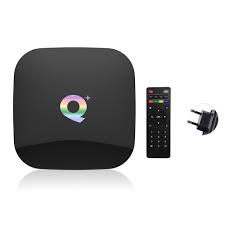
Qplus Android Smart TV Box
Image
  Qplus TV box operates on the Android 9 version that is a better operating system. It has four core cortex A53 processors. The CPU is 64-bit Quad-core. It supports 6K Ultra HD video. It has a RAM of 4GB. Most of the apps installed on the box probably use 1GB all together. You will get a bad experience with 1GB of TV boxes. The storage is 32GB in the Qplus smart TV box. It is a pretty nice-looking box. It comes in all black color. It has two USB ports. You can plug in a USB drive to an external hard drive. You can also add a keyboard or mouse pad to USB ports. You can utilize this extra USB port. It has one HDMI port for output. It also has an SD card port. You can directly plug in your SD card in this TV box. It also has an ethernet port, so you can easily connect physical lines. It also comes with an optical power port. The top of the box has a glossy black finish. It looks like black glass. On the bottom, It has a matte finish. Specifications Quad-core processor 4GB RAM 32 GB RO...

Activity Monitor On Mac: Details And How To Use It

Image
The Activity Monitor is hidden deep down inside your application folder. You will find this option under the utility tab. This tool can help you diagnose slowdowns as well as problems on your computer or laptop. You can also understand how much individual energy programs are using. In short, it is very useful for battery-powered laptops. This tool can also offer you a constant update on CPU usage as well as Memory usage. However, sometimes too much information is not a good thing. In short, there are a lot of things that are perfectly normal in Activity Monitor. As a result, there is nothing to worry about. The system is designed to use all the available resources. Dock Icon Go to the view menu, and after that, select the dock icon option. You can set it to act as a live icon. It can show you CPU usage, CPU history, Network usage, Disk activity, as well as the default app icon. CPU The CPU is the Central Processing Unit. This section contains several columns that describe everything ha...

HOW TO FIX GMAIL NOTIFICATIONS NOT WORKING?

Image
Gmail is an excellent and free email platform all over the world given by Google. It is compatible with any device such as Android, desktop, or iOS. Users can receive, send, and reply to an email. But according to multiple users, they are unable to use Gmail on their device due to out-of-date Gmail apps. If you are struggling to locate its resolutions, then here are some instructions given below. Update the Gmail App to the Newest Build To update the Gmail application to the newest build, follow these on-screen directions given below: Invoke the Google Play Store and select the hamburger menu icon. After that, select the ‘My Apps & Games’ option and reach the tab Installed. You should locate and select the Gmail option. Finally, choose the button of Update and check whether Gmail notifications are operating correctly. Turn off the Device's Power Saving Mode  To turn off the power saving mode of the device, follow these on-screen directions given below: Invoke the notification p...

How To Fix HP Printer Error Code 49.4c02

Image
HP printer 49.4c02 error is a frustrating error among HP users. The error can happen to any HP printer. It may be very disappointing to see the error especially when you are going to print some important documents. If you are faced with a problem, the steps will take you out of the trouble. Just follow the steps and quickly fix the problem. Let's get started. Delete Print Queue Jobs If you have encountered the error code 49.4c02 on your HP printer, you can fix the problem in quick and easy ways. Follow these steps:' Tap on the printer icon that appears at the right-hand corner of your PC in order to open the printing device. Open the print queue list. Delete all the jobs that are in the queue. Print a Test Page After turning off your HP printer, remove the power chords and all cables attached to your system. You need to turn it on and check if the HP printer is in the ready state. After this, you can print a test page. Disable Advanced Printing Settings An HP user can troublesh...