Posts

Showing posts with the label Error Code 006 on Canon Printer

What are the ways to use Google Maps Offline?

Image
  Google Maps is an excellent navigation service from Google. The navigation service from Google works as a digital guide to explore unknown places and navigate a particular location. The service works best with an internet connection, but what if you want to use it offline. Fortunately, Google Maps can be used without an internet connection.  Using Google Maps offline mainly helps when you are on an adventure trip and you lose your device’s data connection. For this good reason, getting Google Maps offline will be the best deal. Moreover, let’s understand how Google Maps works offline.  How offline Google Maps works?   There is no doubt that Google Maps works offline. To use it without a data connection, you will have to download the area where you want to navigate on your device before using it offline. Before losing an internet connection, make sure to download the offline mode of that area or location where you have to navigate.  Further, you can grab a...
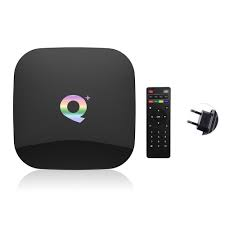
Qplus Android Smart TV Box

Image
  Qplus TV box operates on the Android 9 version that is a better operating system. It has four core cortex A53 processors. The CPU is 64-bit Quad-core. It supports 6K Ultra HD video. It has a RAM of 4GB. Most of the apps installed on the box probably use 1GB all together. You will get a bad experience with 1GB of TV boxes. The storage is 32GB in the Qplus smart TV box. It is a pretty nice-looking box. It comes in all black color. It has two USB ports. You can plug in a USB drive to an external hard drive. You can also add a keyboard or mouse pad to USB ports. You can utilize this extra USB port. It has one HDMI port for output. It also has an SD card port. You can directly plug in your SD card in this TV box. It also has an ethernet port, so you can easily connect physical lines. It also comes with an optical power port. The top of the box has a glossy black finish. It looks like black glass. On the bottom, It has a matte finish. Specifications Quad-core processor 4GB RAM 32 GB RO...

How to Fix OneDrive is Deleting Files Automatically?

Image
  OneDrive is one of the best and default saving locations for the document and files. You can save your new files and documents automatically to OneDrive unless you select to save them to another location on the system. But some users are reporting that OneDrive is removing the files out of nowhere automatically. So, if you want to solve this annoying issue, here are some instructions provided below. Check the Hard Disk for Bad Sectors To check the hard disk for bad sectors, follow these on-screen steps mentioned below: First and foremost, open the Run accessory by holding the Win and R hotkeys altogether on the keyboard. Then type ‘cmd’ in it and hit the Enter button to launch the Command Prompt screen. Once you get it, right click on it then select the ‘Command Prompt with administrative rights’ option. Later, type ‘chkdsk /f /r’ into it and press the Enter button. Now, reboot the system after the procedure. Update the OneDrive Client To update the OneDrive client, follow these ...

How to Fix HP Printer Code 49 Error

Image
HP printer code 49 error can be dreadful to an HP printer user. It is a common error that an HP printer user may encounter anytime. This error is generally caused by software problems, firmware defects, and communication issues. In this article, we have mentioned the ways to fix the HP printer code 49 error. It is time to know how to troubleshoot the HP printer code 49 error in a few simple ways. What Happens When 49 Error Occurs? Generally, HP printer error code 49 is a technical error that does not let your printer process the files properly. Sometimes, the printer cannot interpret the files. One can resolve the issue by following the steps mentioned below. Click on "Cancel Job" to Clear the Memory Hit the "Cancel Job" button on the printer. This will assist you in cleaning your printer. Now, you need to turn off the power button, then wait for some minutes, and then turn it on to view whether your HP printer error code 49 is gone or not. Print with Different Soft...

Ways To Fix Common Ink Problems On Canon Printer

Image
Canon printer users are advised not to install third-party cartridges in their printers as these cartridges may not be compatible with your Canon printer. Third-party cartridges may damage your Canon printer to a great extent. If you have recently bought a Canon printer, you may face several common ink problems on it. To help Canon printer users eliminate these problems, we have mentioned some of the great solutions below. One can quickly fix the ink problems on their Canon printer with the effective methods below. Let's learn all these methods one by one. Things To Keep In Mind To Avoid Ink Problems On Canon Printer In order to avoid ink problems on your Canon printer, you should not buy third-party cartridges. When you install a cartridge, make sure that there is no cartridge leak problem. Always use the branded ink cartridge manufactured by Canon as they are designed mainly for Canon printers, so there would be no ink problem on your printer. Note: One can avoid the ink problems...

Troubleshoot "Ink May Have Run Out" Error Message on Your Canon Printer

Image
How annoying it may be when you see the "Ink may have run out" message on your printer. Have you tried all the possible solutions to fix the error but couldn't do it? If yes, you are lucky to have come to the place. The article has been prepared to help you resolve the issue on your Canon printer. To drive the problem away, all you need to do is follow the steps given below. Know Why You Are Encountering the Issue One cannot fix the error message until he/she knows the root causes of the error. To help you better understand the problem, we have provided the reasons behind the error message. The reasons have been provided below. The printer may not be detecting the ink level correctly. The printer may have the ink detection feature disabled. If your printer shows the above-mentioned error message, the above may be the reasons behind the error message. Fixing the issue is relatively easy once you know the right and effective solution. Quick Procedure to Fix the Error Messag...

How to Troubleshoot the Error Code 006 on Canon Printer

Image
Are you facing the error code 006 on your Canon printer? Have you become tired of searching for the right solution to fix the error code? If yes, you are lucky to have come to the right place. Any Canon printer user may get disturbed by the error code 006. The occurrence of this error code may affect the performance of your printer. In this article, we will mention the effective ways to rectify the error code. We will also mention why the error code 006 occurs. Let’s get started. Why Does the Error Code 006 Occur? The error code 006 is a technical error that can occur on any Canon printer. The printing error appears and suddenly stops the functioning of your printer. We have mentioned below why the error code 006 occurs. The reasons include: Improper installation of the service tool. Minor defects in the service tool. Issues with the drivers or ink cartridge. Note: The error code 006 is caused by the technical issues mentioned above. In this situation, your Canon printer stops function...