Posts

Showing posts with the label PC

Qplus Android Smart TV Box
Image
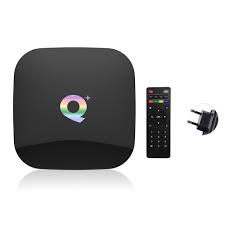
  Qplus TV box operates on the Android 9 version that is a better operating system. It has four core cortex A53 processors. The CPU is 64-bit Quad-core. It supports 6K Ultra HD video. It has a RAM of 4GB. Most of the apps installed on the box probably use 1GB all together. You will get a bad experience with 1GB of TV boxes. The storage is 32GB in the Qplus smart TV box. It is a pretty nice-looking box. It comes in all black color. It has two USB ports. You can plug in a USB drive to an external hard drive. You can also add a keyboard or mouse pad to USB ports. You can utilize this extra USB port. It has one HDMI port for output. It also has an SD card port. You can directly plug in your SD card in this TV box. It also has an ethernet port, so you can easily connect physical lines. It also comes with an optical power port. The top of the box has a glossy black finish. It looks like black glass. On the bottom, It has a matte finish. Specifications Quad-core processor 4GB RAM 32 GB RO...
A Guide to Disable Desktop and Documents Sync with iCloud Drive

Image
  Do you use a Mac computer? Want to disable desktop and documents sync with iCloud Drive? All of the Apple devices cover various excellent features that provide the users with the best ever experience. And when the company launched MacOS Sierra, it provided the users with the iCloud feature. This feature can be used on all models of Mac computers. iCloud Drive automatically syncs your documents and desktop folders on your Mac. The following functionality not only stores your desktop and document folders on iCloud Drive, but also enables you to access them on your other Apple devices with the Files app. That means you can start working on a document on your Mac computer and can continue working on it using your iPhone or iPad. However, there is just one drawback, and that is the free storage capacity on iCloud is limited. More About iCloud Drive and How to Disable It By enabling the functionality, everything on your Mac computer automatically stays up-to-date. To use iCloud Drive, ...