Posts

Showing posts with the label Multimedia

Best Ways to Increase Twitter Followers

Image
  Source:  https://thefreebuilder.com Twitter is a popular micro-blogging site that currently has more than 330 million users. Growing followers on Twitter is not as easy as you may be thinking. If you have become tired of trying all the tips and tricks on Twitter but couldn’t get the expected result, finally, you are at the right place. We have brought you some of the best and proven ways to increase Twitter followers that even experts never spill beans on. These methods will surely help you reach your target and make you famous on Twitter. Now is the time to get started. Optimize Your Twitter Profile When searching for a person on Twitter, you will most likely open the attractive people to check who the person is. This indicates that a person is easily impressed by an attractive profile and is more likely to click on an account with a beautiful photo. Make sure that your profile picture looks neat, clean, and beautiful. If your Twitter profile fails to impress others, your c...
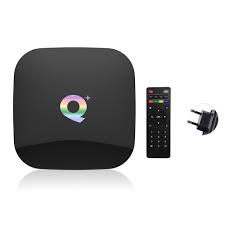
Qplus Android Smart TV Box

Image
  Qplus TV box operates on the Android 9 version that is a better operating system. It has four core cortex A53 processors. The CPU is 64-bit Quad-core. It supports 6K Ultra HD video. It has a RAM of 4GB. Most of the apps installed on the box probably use 1GB all together. You will get a bad experience with 1GB of TV boxes. The storage is 32GB in the Qplus smart TV box. It is a pretty nice-looking box. It comes in all black color. It has two USB ports. You can plug in a USB drive to an external hard drive. You can also add a keyboard or mouse pad to USB ports. You can utilize this extra USB port. It has one HDMI port for output. It also has an SD card port. You can directly plug in your SD card in this TV box. It also has an ethernet port, so you can easily connect physical lines. It also comes with an optical power port. The top of the box has a glossy black finish. It looks like black glass. On the bottom, It has a matte finish. Specifications Quad-core processor 4GB RAM 32 GB RO...

How to Set Up Google Chrome Tab Groups

Image
Do you know how many tabs you can open in Google Chrome? Well, most of the users open 10-15 tabs at a time, but things are different from those who do a lot of research on the internet browser. It’s not easy for everyone to manage opened tabs, so Google has added a new Tab Groups feature to manage opened tabs more conveniently. So if you’re ready to organize your Chrome tabs using Tab Groups, here’s that you need to do. How to Create Google Chrome Tab Groups Make a right-click on the Chrome Tab. Press Add tab to the new group. Type a name in the tab group. Choose a color for the tab group. Make a right-click on another tab to add. Press Add tab to the group. Press on the tab group to add it. Once you create a tab group, you can customize it by changing its group name and color. Just by dragging the group, you can change its position and can even place it between the other opened tabs. Group Tab Current Limitations Well, it's true that the Tab Groups feature on Chrome is really inte...